What is IBO Player?
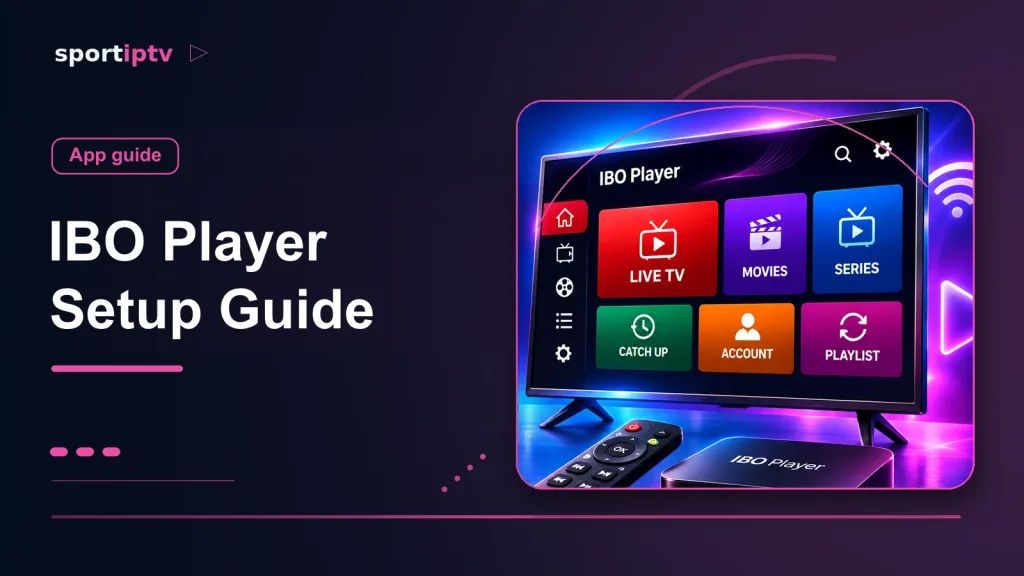
IBO Player is an IPTV player app. It does not include channels — it plays the subscription you add to it. The home screen is split into Live TV, Movies, Series and Catch Up, and it supports both Xtream Codes logins and M3U playlists.
Its biggest strength is reach. Samsung and LG TVs do not have Google Play, so apps like TiviMate are not an option there. IBO Player fills that gap: it is listed in the Samsung and LG app stores as well as on Android TV and Fire TV. That makes it a natural choice when you want IPTV on the TV itself without adding a box — see our smart TV IPTV guide for the bigger picture.
IBO Player vs IBO Player Pro
| IBO Player | IBO Player Pro | |
|---|---|---|
| Interface | Classic layout | Newer layout with more display options |
| How you add a playlist | MAC address + device key on the website | MAC address + device key on the website |
| Playlist types | Xtream Codes and M3U | Xtream Codes and M3U |
| Best for | Older TVs and devices | Recent smart TVs and streaming devices |
Both versions work the same way. If one is not listed in your TV's store, search for the other. Your playlist is tied to the MAC address shown in whichever app you install, so add it on the website that matches that app.
Step 1: Install the IBO Player app
| Device | Where to find IBO Player |
|---|---|
| Samsung smart TV (Tizen) | Home › Apps › search "IBO Player" |
| LG smart TV (webOS) | LG Content Store › search "IBO Player" |
| Android TV / Google TV | Google Play |
| Amazon Fire TV Stick | Amazon Appstore, or Downloader on Fire OS |
| Android phone or tablet | Google Play |
Open the app after installing. The first screen shows two values you will need in the next step: the MAC Address and the Device Key. Take a photo of the screen with your phone so you can copy them exactly.
On a Fire TV Stick, Downloader only works on Fire OS models. Our Firestick IPTV guide explains how to check your model and set Downloader up.
Step 2: Add your playlist on the IBO Player website
- Open the official websiteOn your phone or computer, go to the official IBO Player website and choose Login or Manage playlist.
- Log in with your TV's detailsEnter the MAC address and device key exactly as they appear on the TV.
- Add a playlistChoose Add playlist. Give it a name (for example "sportiptv").
- Enter your subscriptionPaste your M3U URL, or pick Xtream Codes and enter the server URL, username and password.
- SaveClick Save or Submit.
- Refresh the TVClose and reopen IBO Player, or choose Reload. Your channels appear.
Several look-alike websites copy IBO Player's design. If you are not sure which one is official, ask your representative for the correct link before entering anything.
What is the difference between an M3U URL and Xtream Codes? It is all explained in our M3U playlist guide.
Step 3: IBO Player activation
IBO Player comes with a trial period. After it ends, the app needs a paid activation, done on the same website with the same MAC address. Activation pays for the player only — it does not include any channels, and it is separate from your IPTV plan.
- Check the current activation options and price on the official website before paying.
- Activation is tied to the device's MAC address, so a new TV needs its own activation.
- If you would rather not pay for a player, Android TV and Fire TV have free alternatives — see best IPTV players.
Using IBO Player day to day
- Live TV: channels are grouped by the categories your provider sets — sports, news, kids and so on.
- Favorites: hold OK on a channel to add it, so your daily channels are one click away.
- TV guide: open the EPG to see what is on now and next.
- Movies and Series: on-demand libraries with seasons and episodes, if your plan includes them.
- Catch Up: on supported channels, go back to programs from recent days.
- Settings: change the player, subtitles, language and parental lock.
IBO Player on Samsung TV: tips
- Update the TV first: Settings › Support › Software Update.
- Use Ethernet or 5 GHz Wi-Fi — Samsung TVs often sit far from the router.
- If the app freezes, unplug the TV for 30 seconds (a full restart, not standby).
- Older Samsung models (roughly before 2018) may not list IBO Player. A Fire TV Stick or Android TV box is the simple fix.
IBO Player login problems and fixes
The playlist does not appear
Check the MAC address on the website character by character (letters, numbers and colons), then reload the app. Make sure you used the website that matches the app you installed (IBO Player vs IBO Player Pro).
"Playlist failed" or a blank screen
Re-check the M3U URL or the Xtream server, username and password. If they are correct, send your representative a screenshot of the error (never your password in a public place).
It asks for activation
The trial ended. Activate on the official website with the same MAC address.
Channels buffer or freeze
Usually the Wi-Fi. Our IPTV buffering guide lists ten fixes in order. Login and error messages are covered in IPTV not working.
One subscription, several TVs with IBO Player
Because IBO Player ties everything to the MAC address, each TV or device has its own entry on the website. That is useful in a family home: the living-room Samsung, the bedroom LG and a Fire TV Stick in the kids' room can each have IBO Player with the same playlist added. Two things to keep in mind:
- Activation is per device. Each MAC address needs its own player activation after the trial.
- Screens are per plan. Your IPTV plan decides how many devices can watch at the same moment. If three TVs play at once, you need a plan with at least three screens — compare them in our plans.
- Mixing apps is fine. You can use IBO Player on the smart TVs and TiviMate on an Android TV box with the same subscription.
Keeping your IBO Player setup secure
Your playlist link and login are personal. A few simple habits keep them that way and save you headaches later:
- Only enter your MAC address and playlist on the official website — never on a page someone posts in a comment or forum.
- Use the website's playlist protection option (a PIN) if it is offered, so nobody else can change your playlist.
- Do not share screenshots that show your full server URL, username or password.
- If you change TVs, remove the old device's playlist from the website.
- Turn on the parental lock in IBO Player settings if children use the TV.
If anything looks wrong — a playlist you did not add, or channels suddenly missing — contact your representative on WhatsApp and they will check the account with you.
Test IBO Player before you commit
Install IBO Player, then request a free trial on WhatsApp. A representative will send your login and help you upload the playlist with your TV's MAC address, so you can watch real channels on your own TV before choosing one of our plans.
Questions
How do I set up IBO Player?
Install the app, note the MAC address and device key on its first screen, then add your M3U or Xtream Codes playlist on the official IBO Player website and reload the app.
Where do I find the MAC address in IBO Player?
On the first screen that opens when you launch the app, next to the device key.
Is IBO Player free?
It starts with a trial. After that the player needs a paid activation on its website. The activation does not include channels.
What is the difference between IBO Player and IBO Player Pro?
They work the same way. IBO Player Pro has a newer interface; use whichever is listed in your TV's app store.
Can I install IBO Player on a Samsung TV?
Yes. Open Apps on the Samsung TV, search for IBO Player, install it and add your playlist on the website.
Does IBO Player work on Firestick?
Yes. Find it in the Amazon Appstore, or install it with Downloader on a Fire OS stick.
Why does my IBO Player playlist not load?
Usually a typo in the MAC address, URL or login, or the playlist was added on the wrong website. Fix the details and reload the app.
Does IBO Player come with channels?
No. It is a player only. Your channels come from your IPTV subscription.
Can I use IBO Player on several TVs?
Yes. Install it on each TV and add your playlist to each device's MAC address. Each device needs its own activation, and your plan sets how many can watch at once.